

Investing in digital marketing without a clear view of your results is essentially throwing your hard-earned capital into a black hole. For many UK business owners, the prospect of setting up conversion tracking on my website feels like a daunting technical hurdle, cluttered with confusing acronyms like GA4 and GTM. You likely feel the frustration of seeing clicks on your ads whilst wondering if they actually lead to a single enquiry or sale. We understand that the fear of breaking your site’s code or getting lost in a maze of API settings is a genuine barrier to scaling your operations.
This guide will change that. We will show you how to transform your digital presence from a passive brochure into a high-performance growth engine that justifies every penny of your budget. You will learn to build a reliable, privacy-compliant dashboard that provides total clarity on your marketing ROI. We are going to break down the latest 2026 updates, from server-side tracking to the new Google Tag interface, ensuring your setup remains robust and accurate for the long term.
Key Takeaways
- Shift your focus from vanity metrics like clicks to sanity metrics that measure tangible business revenue and financial performance.
- Utilise Google Analytics 4 and Google Tag Manager as a powerful, jargon-free command centre for all your website behaviour data.
- Determine the most effective technical approach for setting up conversion tracking on my website to capture granular data for smarter bidding.
- Follow a structured, risk-free framework to audit your digital presence and configure tracking without compromising your website’s code.
- Discover how a bespoke setup by a professional Kent agency ensures your tracking is built for long-term scalability and industry leadership.
Why Conversion Tracking is the Foundation of Your Digital Growth
Website traffic is a vanity metric that looks impressive on a monthly report but doesn’t necessarily pay the salaries. To build a truly scalable organisation, you must understand what conversion tracking is and how it serves as the essential bridge between a visitor’s click and your company’s revenue. Setting up conversion tracking on my website is the single most important technical task for any business owner who treats their digital presence as a growth engine rather than a static brochure.
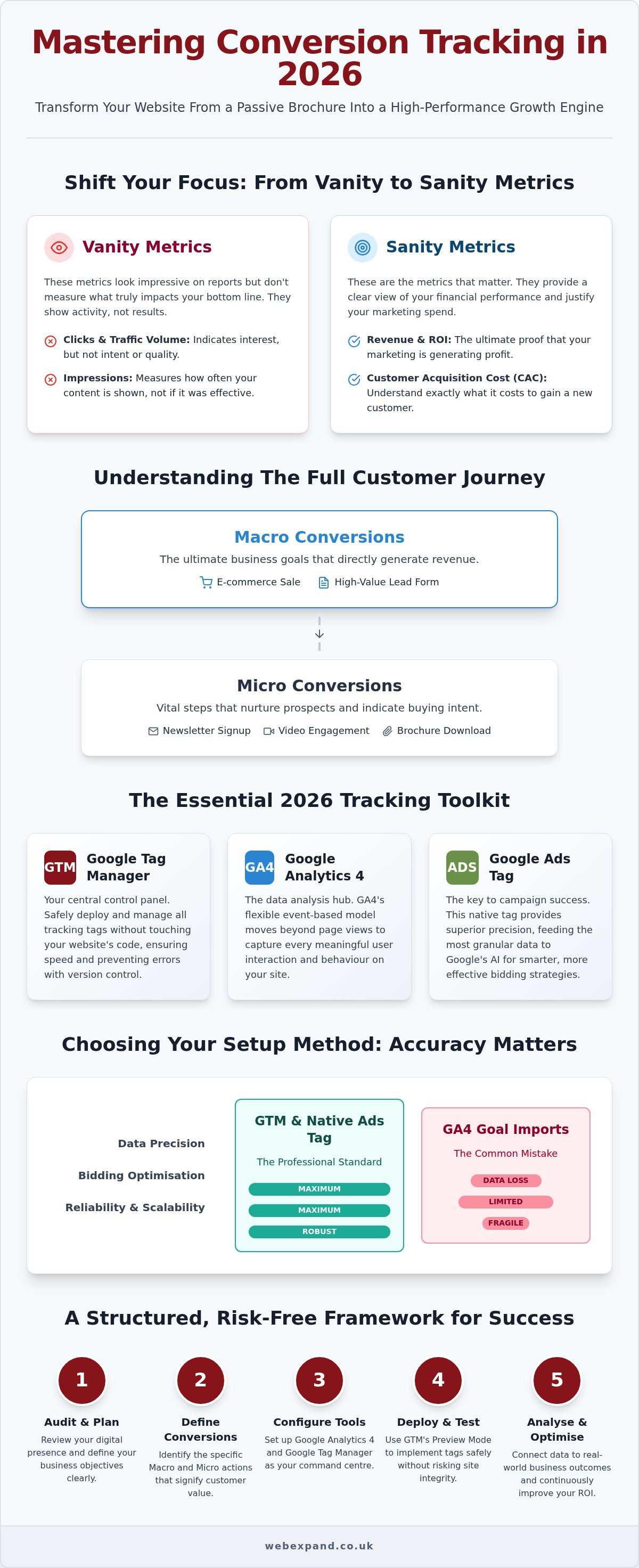
Clicks are vanity metrics; conversions are sanity metrics. Whilst a high volume of traffic suggests interest, only conversions prove that your marketing is actually working. In 2026, Google’s machine learning algorithms have become the primary drivers of success. These systems require constant, high-quality data signals to identify which users are likely to become customers. By tracking these outcomes, you allow AI to find your best prospects whilst you sleep, ensuring your budget is always working towards a measurable result. To understand how these data signals are used to power high-performance lead generation funnels, you can learn more about TVGM and their results-driven approach to digital growth.
The Financial Impact of Data Blindness
Marketing without tracking creates a “leaky bucket” syndrome. You might spend thousands on digital ads, but if you can’t see which keywords lead to sales, you’re likely wasting a significant portion of your budget on dead-end traffic. Precise tracking provides the data needed to calculate your Customer Acquisition Cost (CAC) with absolute certainty. In 2026, ROI is the real-time heartbeat of your digital strategy, acting as the primary signal for algorithmic scaling and resource deployment across your entire business.
Macro vs. Micro Conversions
Every customer journey is unique, and not every visitor is ready to commit on their first visit. Macro conversions are your primary objectives, such as a completed e-commerce sale or a high-value lead form submission for your Kent business. Micro conversions, including newsletter signups or engagement with your latest video, represent the vital steps leading up to that final decision. Tracking these smaller interactions is essential for a long-term SEO and Google Promotion strategy, as it allows you to nurture prospects and understand the specific behaviour that drives industry leadership.
The Essential Tools for Tracking Website Conversions in 2026
Mastering the technical landscape of 2026 requires a focused toolkit. Google Analytics 4 (GA4) sits at the centre of this ecosystem, acting as the primary hub where all user behaviour data is processed and analysed. However, successful implementation relies on Google Tag Manager (GTM) to act as the essential middleman. When setting up conversion tracking on my website, I view GTM as the control panel that simplifies complex code management without requiring a developer for every minor change.
Whilst GA4 provides the insights, the Google Ads Conversion Tag offers superior precision for your paid campaigns. Many businesses make the mistake of simply importing GA4 goals into their ad accounts. This often leads to data loss or attribution errors. Using the native tag ensures your bidding strategies receive the most granular signals possible. For a truly professional setup, you should also consider CRM integration. This allows you to track “offline” conversions, such as phone calls that turn into contracts, ensuring your data reflects your actual bank balance rather than just digital footprints.
Google Tag Manager: Your Secret Weapon
GTM is indispensable because it allows you to organise and deploy tracking tags whilst keeping your website’s core code clean. One of its most valuable features is version control. This safety net allows you to test new tracking configurations in a preview mode before they go live, preventing accidental site crashes during critical updates. Additionally, GTM improves website speed by loading scripts asynchronously. This means your tracking won’t slow down your page load times, which is vital for both user experience and your SEO services in Kent.
GA4 and the Shift to Event-Based Tracking
The 2026 standard has moved entirely away from old-fashioned page views towards a flexible, event-based model. Every interaction is now an event. To succeed, you must identify “high-value events” that signify genuine intent amongst your visitors, such as downloading a brochure or starting a checkout process. Large-scale implementations, such as those managed by the Digital Analytics Program (DAP), show that precise event definition is the only way to gain a competitive edge in a data-saturated market. Setting up conversion tracking on my website using this event-first mindset ensures you capture the nuances of the modern customer journey.
If you’re unsure which events represent your most profitable opportunities, we can help you audit your current tracking setup for maximum impact.
Comparing Conversion Tracking Methods: GTM vs. GA4 Imports
Deciding on the right method for setting up conversion tracking on my website is a pivotal moment in your digital strategy. You have two primary paths: the native Google Ads Tag, usually deployed via GTM, or importing events directly from GA4. Whilst both aim to measure success, they differ significantly in data granularity and how they influence Google’s bidding algorithms. For businesses focused on precision and aggressive scaling, the native approach is almost always superior.
When to Use Native Google Ads Tracking
The native Google Ads Tag is the preferred choice for organisations managing high-spend campaigns in London and across the UK. Its primary advantage lies in its ability to support Enhanced Conversions, a privacy-compliant feature that uses hashed first-party data to recover conversions that might otherwise be lost. By communicating directly with the ad platform, this method provides the most granular data signals for automated bidding. It often captures interactions that GA4 might miss due to complex cookie consent choices, ensuring your attribution model remains as accurate as possible.
The Simplicity of GA4 Goal Imports
For smaller Kent businesses with simpler requirements, importing goals from GA4 can be an attractive, low-friction option. If you’ve already configured your high-value events within Google Analytics, you can simply link these to your Google Ads account with a few clicks. This creates a unified view of performance across all your Google Promotion and SEO Category efforts. However, this simplicity comes with a trade-off. GA4 imports typically suffer from a 24-hour data delay, which can hinder real-time campaign optimisations. Additionally, GA4 uses a different attribution model that may not align perfectly with how Google Ads evaluates the final click before a sale.
Ultimately, the choice between technical complexity and data accuracy depends on your growth stage. Whilst importing is faster, setting up conversion tracking on my website using a native GTM approach builds a more resilient foundation. It ensures that your data freshness is prioritised, allowing you to make high-stakes financial decisions with total confidence. This method protects your interests by providing a reliable, real-time view of which marketing channels are actually generating profit.
How to Organise Your Conversion Tracking Setup: A Practical Framework
Success in digital growth is rarely the result of a single technical fix. It’s the outcome of a structured, logical process. When setting up conversion tracking on my website, I treat the project as a strategic deployment rather than a simple code installation. A disorganised setup leads to double-counting or, worse, missing data that should be informing your financial decisions. To avoid these pitfalls, we follow a rigorous five-step framework designed for accuracy and longevity.
- Step 1: Audit: Review your digital presence to identify every point where a visitor becomes a lead or customer.
- Step 2: GTM Configuration: Create your Google Tag Manager container and install the base script across every page of your site.
- Step 3: Trigger Definition: Specify the exact conditions that count as a conversion, such as a “Thank You” page load or a specific form submission.
- Step 4: Platform Linking: Connect Google Ads, GA4, and GTM to ensure your data flows seamlessly between your analysis and bidding tools.
- Step 5: Validation: Use “Preview Mode” to rigorously test every tag before pushing your changes to the live environment.
Identifying Your “Golden” Conversions
Not all interactions carry the same weight. A “click-to-call” button is a useful indicator of interest, but a completed contact form submission is a “golden” conversion that represents a high-intent lead. For e-commerce sellers in Kent, assigning dynamic values to these conversions is vital. This allows you to see the actual British Pound value of each sale directly within your dashboard. You can verify that your tags are firing correctly by using the GTM debugger to monitor real-time events as you interact with your site.
Ensuring GDPR and Consent Mode Compliance
In 2026, UK businesses must navigate a complex regulatory landscape. The implementation of Consent Mode v2 is no longer optional; it’s a technical necessity for maintaining accurate data whilst respecting user privacy. This system allows your website to adjust how tracking scripts behave based on the visitor’s cookie preferences. A professional setup balances the need for deep insights with legal requirements, protecting your organisation from potential regulatory shifts. By building this foundation correctly from the start, you ensure your data remains reliable even as privacy laws evolve.
If you want to ensure your tracking is both accurate and legally compliant, we can provide a bespoke technical audit to secure your data foundation.
Partnering with a Kent SEO Agency to Optimise Your Results
Whilst the technical steps of setting up conversion tracking on my website are documented online, the execution often determines whether your data is an asset or a liability. A DIY approach frequently leads to “ghost” conversions, broken site layouts, or incomplete data sets that skew your financial reporting. Partnering with a professional agency like Webexpand ensures that your tracking architecture is built on a foundation of precision and reliability. Since 2004, we’ve helped organisations move beyond guesswork by implementing robust systems that capture every nuance of the customer journey.
Our approach is rooted in transparency and measurable outcomes. Our bespoke website design services operate on a fixed-price basis, which includes the technical foundations for tracking as a standard feature. We believe that you shouldn’t have to pay extra for the very tools that prove our marketing efforts are working. By integrating tracking into the core of your site, we provide the data-driven insights necessary to fuel long-term Google Promotion and SEO strategies. This ensures your marketing spend is always directed toward the channels that generate the highest profit margins.
Jargon-Free Advice for Kent Business Owners
Ready to Broaden Your Horizons?
Accurate conversion tracking is the difference between a website that looks good and a website that grows a business. By setting up conversion tracking on my website with professional oversight, you gain the confidence to scale your operations and dominate your sector. This is a transformative journey that turns every visitor interaction into a data point for future success. We invite you to move beyond vanity metrics and start building a data-driven growth engine that protects your interests and secures your financial future.
Contact Webexpand today to organise your professional conversion tracking setup
Master Your Data to Dominate Your Sector
Accurate data is the single most powerful tool in your growth arsenal. By moving beyond vanity metrics and setting up conversion tracking on my website correctly, you gain the clarity needed to make bold financial decisions. You’ve seen how GA4 and GTM work together to provide a real-time view of your performance, whilst features like Consent Mode v2 keep your organisation on the right side of UK privacy regulations. This technical foundation isn’t just about maintenance; it’s about building a scalable engine that fuels your long-term industry leadership.
Since 2004, our Maidstone-based team has provided the jargon-free, expert guidance Kent businesses need to thrive. We offer bespoke website design and SEO management with fixed-price fees, ensuring total transparency as we work together to broaden your horizons. Don’t let your marketing budget disappear into an untracked void. Instead, choose a partner that values precision and measurable outcomes as much as you do.
Book your expert conversion tracking consultation with Webexpand and start your journey toward data-driven success today.
Frequently Asked Questions
How do I set up conversion tracking on my website in 2026?
To begin setting up conversion tracking on my website in 2026, you must first install a Google Tag Manager container. This acts as your central control panel for deploying GA4 events and Google Ads tags. Once the base code is live, you define specific triggers for actions like form submissions or sales. This structured approach ensures your data remains clean and provides a reliable foundation for all your future marketing decisions.
What is the difference between a conversion and a click?
A click is a vanity metric that simply represents a user arriving at your site, whereas a conversion is a sanity metric signifying a completed business goal. Whilst clicks show interest, conversions prove that your traffic is actually generating revenue or leads for your organisation. Tracking conversions allows you to move beyond basic engagement and focus on the specific behaviours that drive your company’s financial growth.
Is Google Tag Manager free to use for my business?
Yes, the standard version of Google Tag Manager is free for the vast majority of businesses. It provides all the essential tools needed to organise and deploy your tracking scripts without a monthly subscription fee. Whilst advanced server-side GTM setups may incur small infrastructure costs on the Google Cloud Platform, the core interface remains a highly cost-effective way to manage your digital presence and data flow.
Why are my Google Ads conversions not showing up in my reports?
Missing conversions are often caused by tag misconfigurations, incorrect trigger settings, or visitors declining cookie consent. Additionally, GA4 imports typically suffer from a 24-hour data delay before they appear in your Google Ads dashboard. You should use the GTM preview mode to verify that your tags are firing correctly. If the tags fire but data is still missing, your consent mode settings may require a professional audit.
Do I need a developer to set up conversion tracking?
You don’t strictly need a developer if you use Google Tag Manager, but professional oversight is highly recommended to avoid data inaccuracies. Setting up conversion tracking on my website involves navigating complex consent settings and API integrations that can easily break if mismanaged. An expert guide ensures your setup is future-proofed against regulatory changes, protecting your marketing budget and ensuring every pound spent is accurately tracked and reported.
What are enhanced conversions and do I need them?
Enhanced conversions are a privacy-compliant feature that uses hashed first-party data, such as email addresses, to recover lost signals caused by browser restrictions. They are essential for any business looking to maintain high-precision bidding in a privacy-first landscape. By providing Google’s algorithms with these extra signals, you ensure your attribution remains accurate even when traditional cookies are blocked, allowing for more effective automated bidding and better ROI.
How long does it take for conversions to become active in Google Ads?
Most conversion actions take approximately 24 hours to begin appearing in your reports after the first successful event is recorded. During this initial period, Google’s system validates the data flow between your website and the ad platform. Using native Google Ads tags often results in faster data processing than importing GA4 goals, providing you with a more real-time view of how your campaigns are performing.
Can I track phone calls as conversions on my website?
Yes, you can track phone calls by using Google’s call forwarding numbers or by integrating your website with a professional CRM system. This allows you to capture “offline” revenue that originally started with a digital click or an organic search. Tracking these interactions is vital for tradesmen and service-based firms in Kent, as it ensures that your marketing reports reflect the actual enquiries coming through your business.