

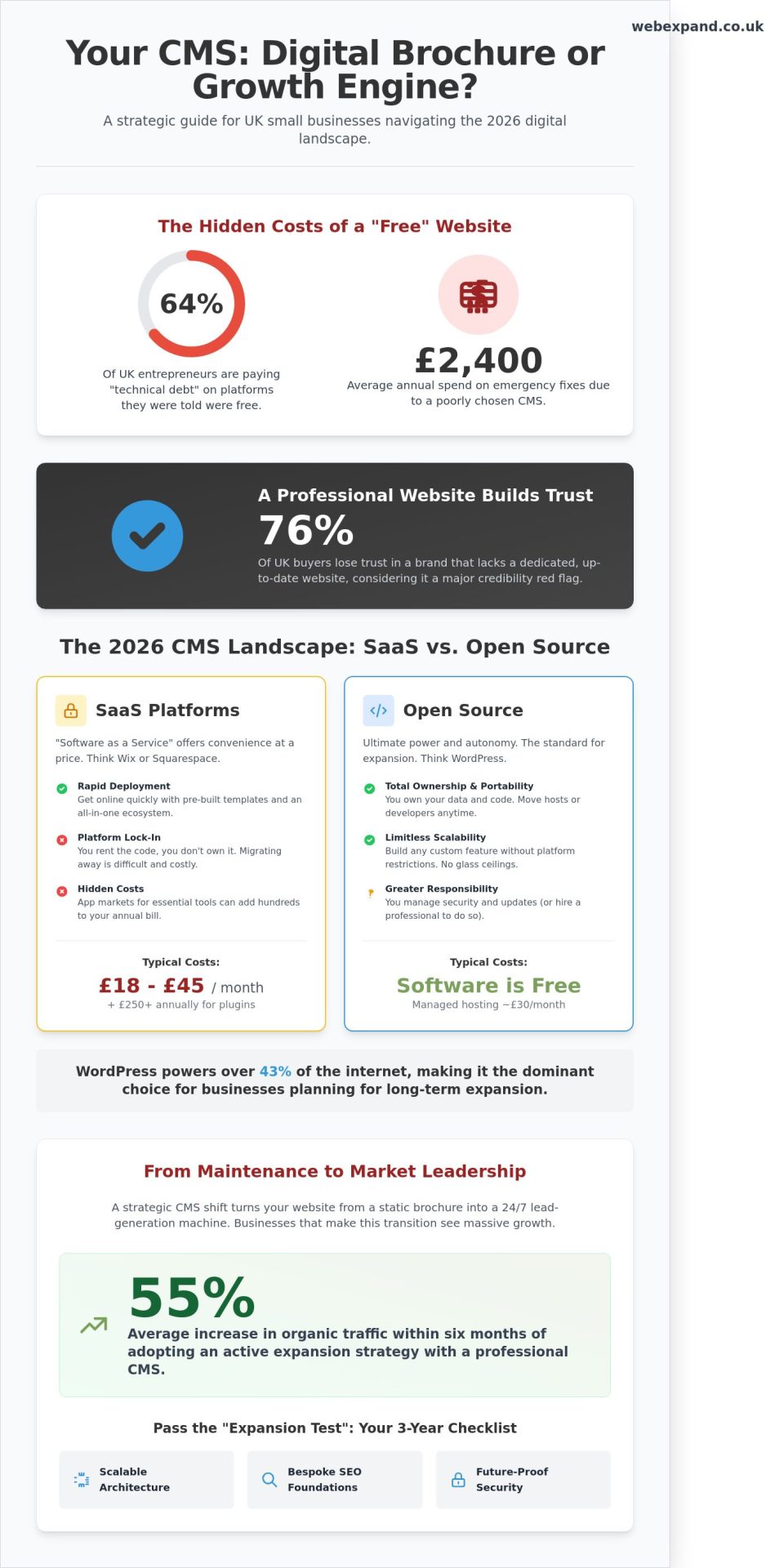
Why are 64% of UK entrepreneurs still paying “technical debt” on a website platform they were told was free? Recent data from the 2024 Digital Growth Index shows that British firms spend an average of £2,400 annually on emergency fixes for a poorly chosen cms for small business. You likely started your journey seeking simplicity, yet you’ve found a maze of monthly costs, security worries, and platform lock-in. It’s exhausting to manage a tool that should be managing your growth for you, especially when you’re ready to scale your operations.
We’re here to shift that dynamic and turn your website into a precision-engineered asset. This guide empowers you to choose a platform that doesn’t just store text; it actively drives your expansion and secures a higher digital ROI. We’ll explore the 2026 strategic landscape. This includes everything from scalable architecture to the bespoke SEO foundations required to dominate your local market and increase your online visibility. By the end of this article, you’ll have a clear roadmap to move from mere maintenance to total market leadership as you optimise your digital presence.
Key Takeaways
- Shift from static web pages to a dynamic growth engine that empowers you to manage content and scale your presence without technical bottlenecks.
- Evaluate the long-term financial impact of SaaS versus Open Source solutions to protect your bottom line and maximise your digital ROI.
- Navigate the “Big Four” platforms to find the ideal cms for small business that balances user-friendly management with professional-grade performance.
- Future-proof your digital architecture by choosing a system that passes the “Expansion Test” for security and scalability over the next three years.
- Discover why bespoke strategy and professional implementation are the keys to converting visitors into loyal customers, far surpassing the results of generic templates.
What is a CMS for Small Business? Beyond Simple Site Building
A Content Management System (CMS) acts as the digital engine powering your growth. It is no longer just a tool for building basic pages; it is a strategic asset that defines how your brand interacts with the market. In 2026, relying on static HTML or hard-coded sites is a liability that slows your momentum. Your business needs to pivot fast. A robust cms for small business allows your team to update prices, launch seasonal campaigns, and publish industry insights without waiting for a developer to clear their schedule. This agility is what separates market leaders from those who merely exist online.
While social media profiles offer visibility, they represent rented land where you have zero control over algorithms or data ownership. A professional website built on a CMS provides the credibility needed to win high-value contracts. Recent 2025 consumer data indicates that 76% of UK buyers lose trust in a brand that lacks a dedicated, up-to-date website. Investing in a professional cms for small business is about taking ownership of your digital footprint and ensuring your brand remains consistent across every touchpoint.
The Core Components of a Modern CMS
The Content Management Application (CMA) is your control centre. It is the intuitive interface where your marketing team creates blog posts or updates product descriptions without touching a single line of code. Behind the scenes, the Content Delivery Application (CDA) handles the technical heavy lifting. It takes that raw data and compiles it into the polished, high-performance site your customers see. This separation is critical for design flexibility. It allows you to overhaul your brand’s visual identity without risking the integrity of your underlying content database.
Why Small Businesses Cannot Ignore Content Strategy
Static sites are dead. To dominate your niche in 2026, your platform must evolve daily. Regular updates signal authority to search engines and build trust with your visitors. This active approach is central to our what makes a good business website blueprint. Businesses that transition from a “set and forget” mindset to an active expansion strategy see an average 55% increase in organic traffic within six months. Your CMS is the tool that makes this rapid growth possible, turning your website from a digital brochure into a lead-generation machine that works 24/7.
The 2026 CMS Landscape: Choosing Between SaaS and Open Source
Selecting a cms for small business in 2026 isn’t just a technical box-ticking exercise. It’s a strategic decision that dictates the trajectory of your digital growth. Before committing your budget, you need a firm grasp of What is a Content Management System and how different architectures impact your long-term agility. You face two primary paths: the controlled convenience of Software-as-a-Service (SaaS) or the limitless potential of Open Source.
SaaS Platforms: Convenience at a Price
SaaS builders like Wix or Squarespace offer rapid deployment for firms that need to be online yesterday. You pay a monthly subscription, typically between £18 and £45, to access a closed ecosystem. While these “all-in-one” tools simplify the start, they often create platform lock-in. You don’t own the underlying code; you effectively rent it. This becomes a bottleneck when you require bespoke functionality. Hidden costs frequently emerge through “App Markets.” A simple booking tool or advanced SEO plugin can add £250 to your annual overheads, draining your budget without adding proportional value.
Open Source: The Power of WordPress and Beyond
WordPress remains the dominant choice for UK businesses planning for expansion, currently powering over 43% of the internet. The primary advantage is total autonomy. You own your data and maintain the freedom to choose your own hosting and developer partners. For a growing firm, this portability is vital. If a hosting provider fails to deliver, you pack up your files and move. While the software is free, you manage the responsibility of security and updates. A managed hosting plan for a high-traffic site might cost £30 per month, but the ROI is found in the ability to scale without hitting a glass ceiling.
AI-Ready Architectures in 2026
By 2026, static content is no longer enough to win. Your CMS must feed AI-driven search engines (SGE) with precision. This requires robust structured data schemas that help Google understand your services instantly. “Headless” CMS options, such as Contentful or Strapi, separate the back-end data from the front-end display. This architecture delivers 35% faster load times on mobile devices. It ensures your content remains accessible across smart speakers, wearables, and traditional screens. Modern platforms now integrate AI for automated content tagging and SEO optimisation, allowing your team to focus on strategy rather than manual entry.
Strategic growth requires a clear view of the Total Cost of Ownership (TCO). A setup that seems cheap today often becomes a liability if it limits your ability to export customer data or integrate new sales channels. We’ve seen firms lose 20% of their organic visibility during messy migrations because their original CMS lacked basic portability. If you want to build a bespoke digital strategy that survives market shifts, prioritise flexibility over initial ease. Your choice of CMS should empower your expansion, not act as a cage for your ambitions.
The Big Four Compared: Finding Your Perfect Business Match
Selecting a cms for small business requires a cold analysis of your growth targets. You need a platform that scales with your ambition without draining your technical resources. Shopify offers the best balance for retail ease; conversely, WordPress provides the most professional power at the cost of increased maintenance. We analyse the four market leaders based on their ability to drive ROI and establish market authority.
WordPress: The Versatile Heavyweight
WordPress powers 43.5% of all websites globally according to 2024 W3Techs data. This dominance creates a massive ecosystem of UK-based developers and 24/7 support options. Success on this platform relies on a foundation of responsive web design to ensure your site performs across every mobile device. You must balance plugin functionality against site speed; exceeding 20 plugins often increases load times by 1.5 seconds, which directly harms your search visibility.
Shopify and Webflow: Specialists in Growth
Shopify is the standard for retail, managing secure payments for 2.1 million merchants with basic plans starting at £25 per month. Webflow serves brands prioritising bespoke visuals, though it requires 30 to 50 hours of training to master its interface. HubSpot integrates your cms for small business with a robust CRM, tracking leads from initial clicks to £5,000 contracts. These platforms offer high professional power with varied learning curves tailored to specific business models.
- WordPress: Best for content-heavy sites and businesses requiring total customisation through code.
- Shopify: The premier choice for dedicated e-commerce and rapid retail expansion with minimal technical friction.
- Webflow: Ideal for design-led brands that want bespoke, high-end visuals without the bloat of traditional templates.
- HubSpot: Best for B2B companies prioritising lead generation and seamless CRM data integration.
The learning curve varies significantly across these options. While you can launch a Shopify store in a single afternoon, mastering Webflow or a custom WordPress build often takes weeks of dedicated effort. We recommend choosing a platform based on your three-year growth plan rather than your current technical comfort level. Investing in a more powerful system now prevents a costly and disruptive migration when your turnover hits the £100,000 mark.
Strategic Selection: Key Criteria for Long-Term Expansion
Choosing a cms for small business isn’t just a technical task; it’s a long-term investment in your brand’s infrastructure. You must apply the Expansion Test: will this platform sustain your growth for the next three years? Many firms outgrow their initial setup within 18 months, leading to expensive migrations. We look for platforms that scale horizontally, allowing you to add complex features without rebuilding from scratch.
Security remains the primary concern for 74% of UK business owners. You’re responsible for your customers’ data. A secure CMS doesn’t just protect information; it protects your reputation. We prioritise systems that offer automated patching and robust encryption to ensure your site remains a fortress as you scale.
SEO and Performance Standards
Google’s 2026 ranking algorithms place immense weight on Core Web Vitals. Your CMS must deliver clean code and lightning-fast loading times. In the UK, where mobile commerce accounts for over 60% of online sales, a one-second delay can drop conversions by 7%. Your platform should serve as the engine for your digital marketing strategy, providing native tools for metadata, schema markup, and rapid indexing.
Security and UK Compliance
Compliance isn’t optional. Your cms for small business must facilitate strict GDPR adherence, including granular cookie consent and secure data processing. Since the 2025 update to UK data laws, the cost of non-compliance has risen sharply. We recommend systems that include:
- Integrated SSL certificate management to encrypt user sessions.
- Automated daily backups stored in secure, UK-based offsite locations.
- Two-factor authentication (2FA) for all administrative login attempts.
User Roles and Collaboration
Efficiency is the secret to scaling. A well-configured CMS saves the average team approximately five hours of administrative work every week. By organising specific user roles, you can allow content creators to draft blogs without giving them access to critical site settings. This protects your site’s integrity while empowering your staff. Look for an intuitive, mobile-first editor that lets you make updates from a smartphone while you’re on the move. It’s about agility and precision.
Ready to build a platform that actually fuels your growth? Book a strategic consultation with our team to find your perfect CMS fit.
Bespoke Implementation: Why Your CMS Needs Professional Strategy
Selecting a cms for small business is only 20% of the battle. The remaining 80% is the strategic execution that turns software into a revenue generator. Most off-the-shelf templates are designed to look good in a preview, but they rarely convert visitors into paying customers. They’re built for the mass market, not for your specific niche in the UK. You need jargon-free advice to build a digital infrastructure that actually works. We focus on precision. We cut through the noise to ensure your investment delivers a measurable return, rather than just another monthly subscription cost.
Bespoke design is the key to standing out in a crowded UK market. When every competitor uses the same basic layouts, your brand’s unique value proposition gets lost. Professional strategy ensures that your CMS architecture aligns with how your customers actually think and buy. It’s about moving beyond “good enough” to achieve market dominance.
The Pitfalls of DIY Site Building
DIY sites often suffer from bloated code and fragmented user journeys. This isn’t just a technical annoyance; it’s a financial drain. Research indicates that 53% of mobile visits are abandoned if pages take longer than three seconds to load. DIY builders often hide these inefficiencies behind a “pretty” facade that lacks substance. Common mistakes include:
- Poor Navigation: Users can’t find what they need within two clicks.
- Weak Calls to Action: Buttons that blend into the background instead of driving sales.
- Technical Debt: Relying on too many third-party plugins that eventually break or slow down the site.
A professional setup ensures your cms for small business is an asset, not a liability. It creates a high-performance growth engine that scales with your ambition.
Partnering for Expansion
WebExpand acts as your strategic partner. We don’t just build websites; we engineer growth. Our approach to bespoke web design focuses on your unique ROI goals. We provide the strategic layer between your business objectives and the technology you use. Whether you’re targeting a 25% increase in lead generation or a total market takeover, the strategy always comes first.
Start your 2026 planning now by auditing your current setup. A refresh isn’t just about a new look. It’s about reclaiming your market share and ensuring your platform is ready for the next decade of digital shifts. We help you move quickly from identifying a market challenge to presenting a data-backed solution. Let’s plan your expansion today.
Secure Your Market Leadership for 2026
Selecting the right cms for small business is no longer just about editing text; it’s a strategic decision that dictates your brand’s ability to scale. By 2026, the divide between basic site builders and high-performance, bespoke systems will define market leaders. Choosing between SaaS agility and open-source control determines your operational overhead for the next five years. You need a platform that balances technical precision with high ROI. Success depends on moving beyond one-size-fits-all templates and investing in a system that grows alongside your ambitions.
Since 2004, WebExpand has provided over 20 years of technical expertise to UK businesses ready to dominate their niche. We cut through the noise with jargon-free, professional advice and fixed-price design fees that ensure your budget remains transparent and predictable. Our team treats your expansion as our own metric for success. We build digital foundations that convert visitors into loyal customers. Don’t let outdated technology limit your visibility in an increasingly competitive landscape.
Ready to expand your digital reach? Explore our bespoke website solutions today.
Your journey toward market leadership starts with a single, well-informed choice.
Frequently Asked Questions
Which CMS is easiest for a beginner to learn in 2026?
Wix remains the most intuitive platform for beginners in 2026 because of its advanced AI Site Generator. You can build a functional, professional website in under 30 minutes by answering a series of prompts about your business goals. While Squarespace offers superior aesthetic templates, Wix’s drag-and-drop interface requires zero coding knowledge. This simplicity allows you to focus on business growth rather than technical troubleshooting.
Is WordPress still the best choice for a small business website?
WordPress powers 43% of the internet in 2026 and remains the premier cms for small business owners who prioritise total ownership and scalability. It offers a library of over 60,000 plugins that allow your site to evolve as your revenue grows. While the learning curve is slightly steeper than “closed” builders, the long-term ROI is significantly higher. We recommend it for ambitious brands aiming for market leadership and precise SEO control.
How much does a professional CMS setup cost for a UK small business?
A professional CMS setup in the UK typically ranges from £1,500 for a basic bespoke template to £7,500 for complex e-commerce integrations. These figures include essential SEO configuration, security hardening, and mobile optimisation. Annual maintenance costs usually sit between £200 and £600 depending on your hosting requirements. Investing in a high-quality setup ensures your digital infrastructure supports expansion without accumulating technical debt.
Can I change my CMS later if my business outgrows it?
You can migrate your content to a new platform, but the process requires precision to protect your existing search rankings. Industry data shows that 15% of UK businesses migrate their CMS every three years as they scale their operations. We manage this by using automated migration tools and 301 redirect maps to ensure zero data loss. Choosing a flexible cms for small business from the start prevents the need for these costly rebuilds.
Does my choice of CMS affect my Google search rankings?
Your CMS choice impacts SEO through site speed, mobile responsiveness, and clean code structures. Platforms like WordPress and HubSpot offer granular control over metadata, which is vital for visibility in competitive niches. Google’s 2025 Core Web Vitals update penalised slow-loading builders that use bloated code. Choosing a high-performance CMS ensures your site meets the technical benchmarks required to dominate local UK search results.
Do I need a separate host if I use a CMS like Wix or Shopify?
No, Wix and Shopify are “hosted” platforms, meaning your monthly subscription fee covers both the software and the server space. This simplified model reduces technical overhead for your team and ensures high uptime. However, if you choose a “self-hosted” CMS like WordPress.org, you’ll need a separate UK-based hosting provider. Expect to pay between £10 and £40 per month for premium business hosting that offers daily backups.
How do I ensure my CMS is GDPR compliant for UK customers?
You must implement a robust consent management platform to handle cookies and user data legally under UK GDPR regulations. Ensure your CMS allows you to store data on UK or EU-based servers to simplify legal compliance. We recommend using tools like CookieBot or OneTrust to manage user preferences automatically. Failing to meet these standards can result in fines of up to £17.5 million or 4% of your global turnover.
What is a “Headless CMS” and does my small business need one?
A Headless CMS separates the content repository from the presentation layer, allowing you to push data to apps, smartwatches, and websites simultaneously. Most UK small businesses don’t need this level of complexity in 2026. Unless you’re managing content across multiple digital touchpoints or require a highly bespoke frontend, a traditional CMS is more cost-effective. Focus on a system that delivers a high ROI for your primary website first.